


Turn Compliance Data Into Competitive Intelligence
Your HMDA and CRA data contains insights about market opportunities, competitive gaps, and lending performance—but only if you can analyze it effectively. DataMine combines your lending data with nationwide peer submissions, Census demographics, and FDIC deposit information to answer critical business questions: Where are competitors outperforming us? Which underserved markets represent growth opportunities? How does our CRA performance compare to peer institutions?
Create unlimited custom reports for board meetings, examiner requests, strategic planning, and fair lending analysis—all from one intuitive interface without Excel spreadsheet hassles.
All of it assumes the underlying data is clean, which is the step before any of this rather than a detail of it: a report built on a LAR that has not cleared its edits is describing data you are about to change. We set out the ten HMDA edit check errors that most often hold up a filing, what each one actually tests, and how to resolve it.
What can you build with DataMine?
The point of a report builder is how little work an unusual question takes, which only shows up in the doing: build a custom submission audit report in the demo.
Four data sources, one platform
Your own current and historical Comply submissions, nationwide peer lending patterns, Census demographics for every tract, and FDIC branch and deposit data — combined instead of juggled.
Flexible report builder
Drag-and-drop tables and charts with up to two tiers on each axis, across LAR, geographic or demographic fields. Save the definition as a template and share it across your organization.
Pre-built report templates
Dozens of ready templates for disclosure tables, performance evaluations, trend analysis and market share comparisons, with new ones added as customers ask and regulations change.
Advanced peer analysis
Filter institutions by asset size, geographic proximity, regulatory agency, lending volume or assessment-area presence, and save as many peer group definitions as you need — your top five competitors, every bank in your state, or your closest asset-size match.
Geographic analysis
Nationwide down to a single census tract, broken out by income characteristic, racial composition or urban/rural designation, to find coverage gaps and CRA credit opportunities.
Multi-year trend analysis
Compare this year against your own history, track growth in a specific market, and measure whether a strategic initiative actually moved the numbers.
Export and publishing
PDF, Excel, HTML or image, for a board presentation or a regulatory submission, with automated generation on a schedule if you want it delivered rather than requested.
What reports does DataMine build?
DataMine ships with many templates and the free library grows as customers ask for new ones. These four are typical, and each is built in minutes rather than assembled by hand.
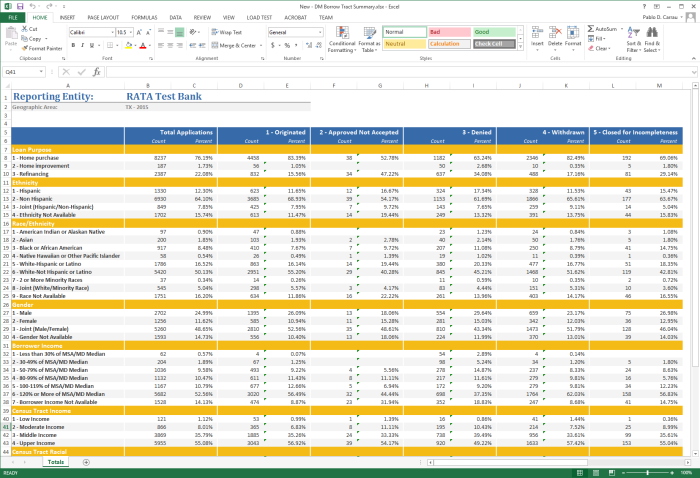
The whole book, cut every way an examiner cuts it
Applications by loan purpose, ethnicity, race, gender, borrower income, tract income and tract racial composition — each against originated, approved-not-accepted, denied, withdrawn and closed-for-incompleteness. Assembling this by hand is a week of pivot tables that has to be redone when one record changes.
- Counts and percentages side by side so a thin cell is visible without arithmetic.
- Reporting entity and geography stated on the sheet, because it will be filed and read later.
- Rebuilt from the database not from an extract, so a corrected record corrects the report.
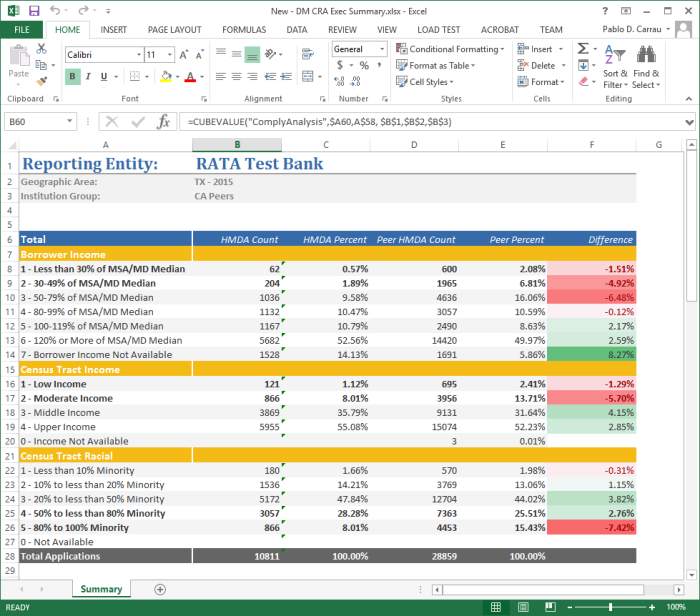
A workbook that re-runs, not a screenshot of last month
The cells are CUBEVALUE formulas against the Comply analysis cube. That is the difference between a report you regenerate and a spreadsheet somebody has to rebuild — and it is why the board pack you produced last quarter is still correct this quarter after a refresh.
- You versus your peer group on borrower income, tract income and tract racial composition.
- Difference column, conditionally coloured so the four-point gap finds you rather than the reverse.
- Live connection refresh the workbook and the analysis re-runs against current data.
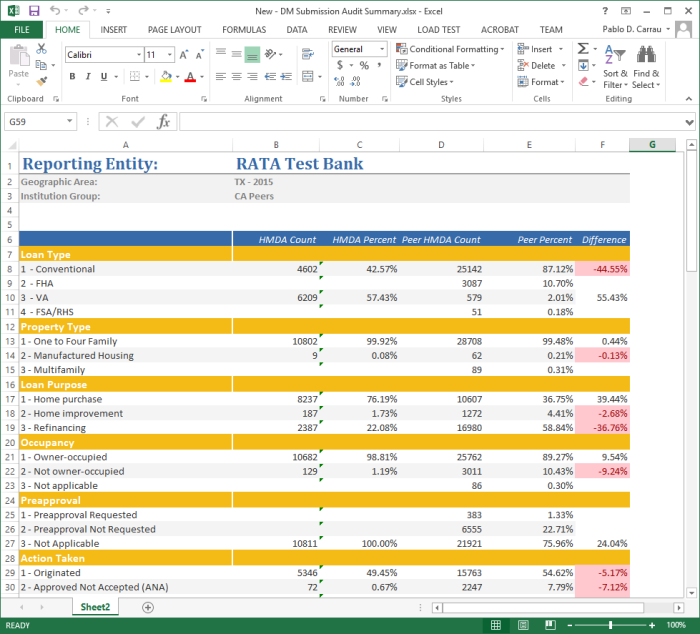
A distribution that looks nothing like your peers’ is usually a mapping error
Run before filing, this is the cheapest data-quality check there is. If 57% of your file is VA loans and 2% of your peers’ is, the likely explanation is a field mapped to the wrong code — and it is far better to find that in March than in an examination.
- Loan type, property type, purpose, occupancy, preapproval and action taken in one pass.
- Peer percentages alongside yours so “is this normal” has an answer.
- Run it pre-submission as an audit, not post-submission as an explanation.
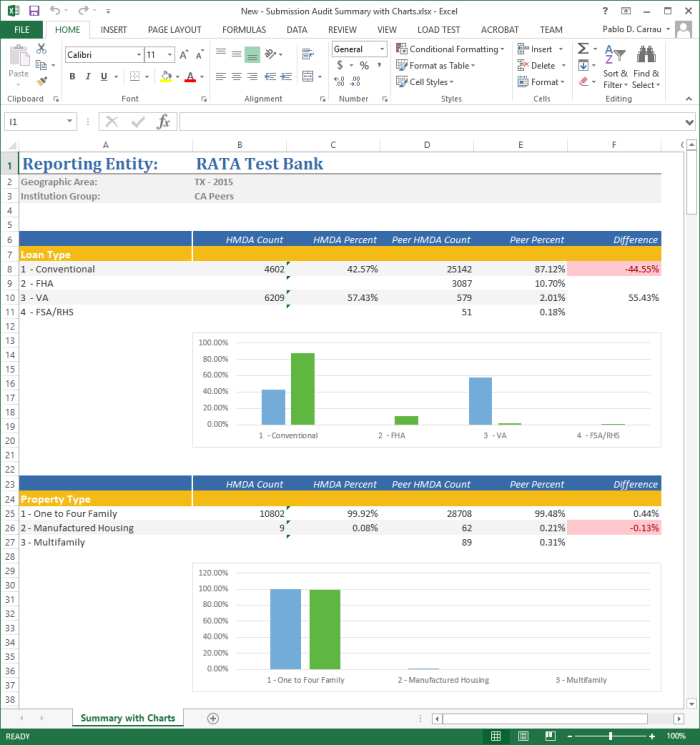
The same numbers, for the audience that will not read the table
Compliance officers read the columns. Boards and examiners look at the picture first. Charting is a property of the report definition rather than a separate piece of work, so both versions come from the same build — and cannot drift apart.
- Charts per block generated from the table above them, not drawn by hand.
- One definition, two outputs so the charted version is never a stale copy.
- PDF, Excel, HTML or image and on a schedule if you would rather it arrived.
- 39years, since 1987
- Hundredsof institutions filing
- 7,062peer institutions in one sample year
- 4export formats, or scheduled
How do you choose a peer group in DataMine?
Examiners increasingly select peers by geography, asset size and filtered loan count. The Peer Group Builder walks you through the same filters, from simple to complex, so you can build the group the way they would.
Name the group, pick the year
Click Peer Institution Groups, select New, name it, and tell the wizard which year of peer data to analyze. Screenshot.
Filter the field
A search with no filter returns every reporting institution — 7,062 for 2014, in our sample. Narrow by General, Properties, Limits, Geographic definitions or Lending areas, alone or combined, until you have the peers that actually match you. Screenshot.
Review the list, build the group
A sample: the top 10 OCC banks by origination volume with at least one loan in Seminole County, Florida. Select all of them or hand-pick specific institutions, sort by any column, and export, add to or print the list. Save as many peer group definitions as you need. Screenshot.
Run the comparison
Minutes later: a table of the top 10 OCC submitters in a saved peer group against all submitters, broken down by action taken. This is a simple example of what the builder and DataMine can do together. Screenshot.
Frequently Asked Questions
The four we are asked most often about DataMine, answered properly rather than in a sentence. If yours is not here, it is a better use of your time to ask a person.
Ask us directlyWhat data sources does DataMine access?
DataMine accesses public HMDA and CRA data from the FFIEC, FDIC Summary of Deposits data, Census demographic data, and your institution's internal compliance data from Comply software. The tool integrates data from multiple years and sources into a unified reporting environment, eliminating manual data compilation and ensuring accuracy.
Can I create custom reports in DataMine?
Yes, DataMine includes a flexible report builder for creating custom tables and charts. Design reports with up to two tiers on X and Y axes using LAR fields, demographic characteristics, or geographic factors. Save report definitions as reusable templates. Pre-built templates are also included for common compliance reports like disclosure tables and performance evaluations.
How do I select peer institutions for comparison?
DataMine's Peer Group Builder lets you filter institutions by asset size, geographic presence, regulatory agency, lending volume, or specific market activity. Select your top 5 competitors, all banks in your MSA, institutions matching your asset tier, or create custom peer groups. The tool shows how examiners select peers, helping you prepare for CRA and fair lending reviews.
Does DataMine integrate with Comply software?
Yes, DataMine seamlessly integrates with all Comply products. Analyze your institution's HMDA, CRA, and SBL data alongside public peer data. Compare internal lending patterns to market trends, benchmark performance against competitors, and create comprehensive reports combining your data with demographic and deposit information—all from a single interface.
Can we run Comply DataMine without installing it?
Yes. RATA Hosted Services runs every Comply module, including DataMine, on Microsoft Azure. RATA installs and configures it, maintains the database with daily backups, and applies updates as they ship. Your team signs in from a browser.
DataMine vs Manual Reporting
See how DataMine transforms compliance reporting and analysis
| Task | With DataMine | Manual Reporting |
|---|---|---|
| Data Access | Instant access to HMDA, CRA, SBL, peer, demographic, and deposit data in one platform. | Download separate files from FFIEC, FDIC, Census Bureau. Manual data compilation and cleanup required. |
| Custom Reports | Drag-and-drop report builder. Create unlimited custom tables and charts in minutes with no SQL or coding required. | Build complex spreadsheets or write database queries. Hours of formula writing, pivot tables, and manual formatting. |
| Peer Selection | Peer Group Builder filters by asset size, geography, lending volume, and regulatory agency. Save peer groups for reuse. | Manual research to identify competitors. Track down HMDA files, filter spreadsheets, maintain peer lists across multiple files. |
| Multi-Year Analysis | Trend analysis across multiple years with one-click year selection. Consistent reporting across all time periods. | Maintain separate spreadsheets for each year. Manual consolidation to compare trends. Formula errors common when updating. |
| Report Templates | Dozens of pre-built templates for disclosure tables, CRA performance, market analysis. Save custom templates for reuse. | Start from scratch for each report. Maintain library of Excel files. Risk of inconsistent formatting and calculations. |
| Geographic Analysis | Analyze by census tract, county, MSA, or state. Filter by tract income levels and demographics with point-and-click interface. | Join multiple data sources. Look up tract characteristics, merge demographic data, create complex VLOOKUP formulas. |
| Export Options | One-click export to PDF, Excel, HTML, or image formats. Polished, professional formatting ready for board presentations. | Copy/paste from spreadsheets into Word or PowerPoint. Manual formatting and cleanup. Inconsistent styling across reports. |
| Time to Complete Analysis | Minutes to hours for comprehensive reporting | Days to weeks of manual spreadsheet work |
What Our Customers Say
Trusted by financial institutions nationwide for compliance excellence
“The folks at RATA were outstanding. Every time I had a question, I would speak to someone who either knew the answer immediately or could provide the answer within a very short period of time. Everyone I spoke with knew their product, industry and was willing to do whatever it took to help us solve our problem. I would highly recommend RATA and COMPLY to anyone who is considering this company and product.”
“The support has been exceptional. The program is very easy to use. RATA has been one of the best companies I have dealt with in my 25 years of banking. Their service has exceeded my expectations.”
“I wanted to let you know that RATA and Comply is the absolute best!!! My submission is complete and was accomplished in record time. I more than doubled the amount of activity I reported last year and it took me less than half the time. Thank you for being there for us and the industry! You are and always will be number one to me!!!”


Methodology & Sources
DataMine's peer, demographic, and deposit figures come from your institution's own HMDA/CRA/SBL submissions combined with nationwide peer submission data, US Census demographic data, and FDIC Summary of Deposits data (see the integrated data sources section above). Report configurations and comparisons are generated on demand from current data, not a fixed dataset. RATA Associates maintains this page and updates it as data sources or capabilities change. Last verified October 21, 2026.
You may republish the figures and methodology on this page with attribution and a link to rataassociates.com/comply-datamine/.


