
Comply News
Comply Version 19.1 Update has been released
Now that submission season is officially over and many of you are now analyzing data and starting your 2020 processing, we are happy to announce that a new version of Comply (version 19.1) is now available for download on our support site support.rataassociates.com. As usual this version contains some nice enhancements and new functionality as well as fixes to previously reported issues. A full list of enhancements and fixes can be found in our Changes document but here are some of the key new features.
Key New Features(in no particular order)
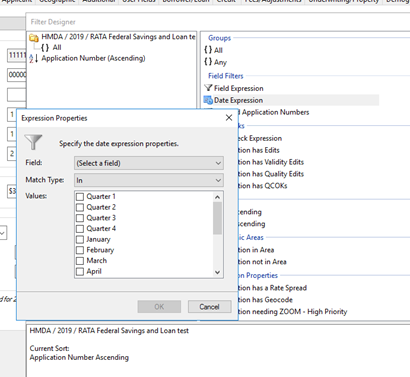
- Date Expression in the filter designer where you can filter by quarter and month without needing a year so that these filters don't need to be copied each year to use. This is very handy for setting up non-year specific filters of your data and will be really helpful in dashboard filters.
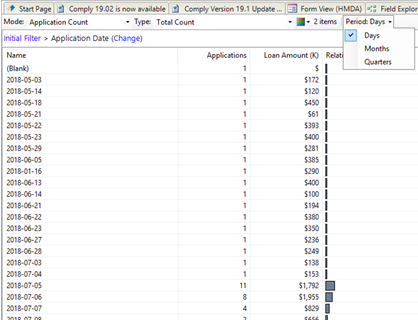
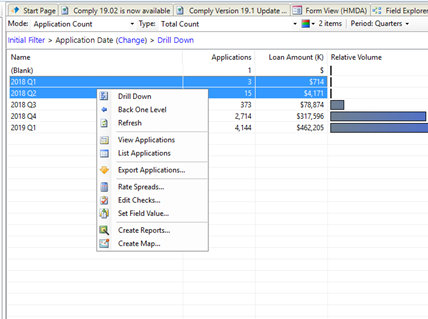
- Exploring on date fields now gives you the option for Days, Months or Quarters for the break downs. This is great information but as always you can easily click individual values to filter down or multi-select to drill down to custom ranges.
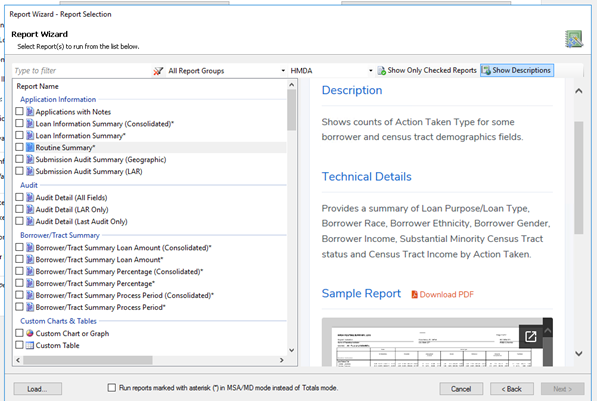
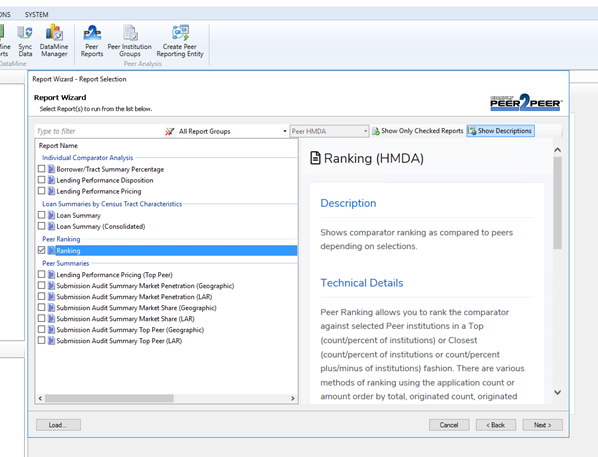
- Report Wizard now shows you a description and sample for each report. Many customers have had a hard time figuring out what each report actually showed just from the titles. We have added some detailed descriptions and a sample of each report in the Report Wizard. You can show or hide the descriptions with a button.
- Peer report functionality has been added to Comply (the Peer2Peer website is being deprecated). For years now, we have been wanting to move the peer functionality into Comply since the old Peer-2-Peer website technology has grown older and out of date. Now you can do everything you did on the old peer site and more directly in Comply using all of the enhanced peer group functionality. We will be expanding the uses and reports over time based on user requests and feedback. Official deprecation date for the peer website is July 31, 2020. We will not be putting 2019 peer data on the website. We are primarily keeping it up for you to retrieve any older reports that you might want to download and keep.
- In Fair Lending, file reviews now show you all control applications that are matched to the target application at once in a multi-column view. Another feature that has been requested for some time, but was a large task to fit in, is the multi-view File Review. Up until now you had to look at matched pairs one at a time. Now, Comply shows you all control applications for a single target application. This makes the file review process much simpler and robust. We have also consolidated field differences and field notes into a more efficient user interface. We will post a video shortly to illustrate these changes and explain some of the subtleties.
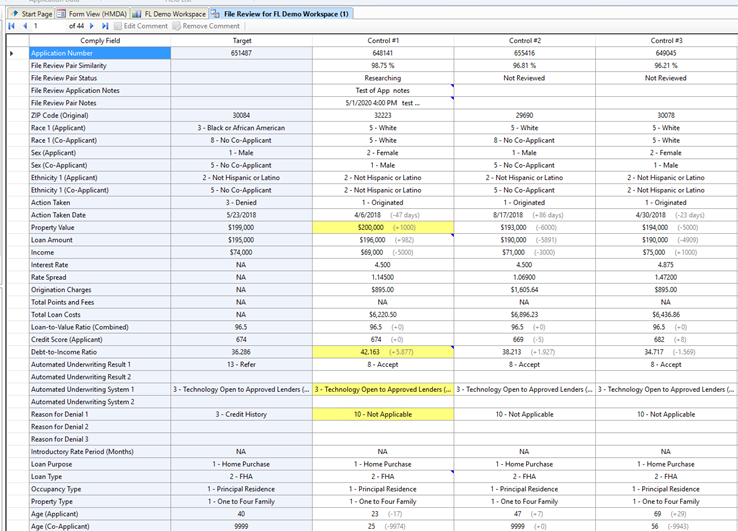
- All pairs can be exported to Excel instead of just one, complete with all notes. The entire file review grid and notes can be exported to excel to transfer or document.
- Application notes in a file review will follow a specific application throughout a workspace. Another user recommendation we implemented with the file review changes was having application notes follow an application throughout a workspace. This way you can easily see things you have already commented about a particular application.
- A system option to automatically apply Auto Updates has been added and defaulted to On. When new auto update files come in such as rate tables, demographic files, geocodes, etc… they will now automatically apply rather than wait for someone to manually apply them. This will be much more convenient. If your security policies prohibit this, the option can be turned off in the Auto Updates section of system options.

Search
Recent Posts
- California's New Fair Lending Exam Law: What State-Chartered Banks, Credit Unions and Mortgage Licensees Should Have Ready
- How to Benchmark Your CRA and HMDA Lending Against Peer Data
- HMDA vs CRA vs Section 1071: What Each Rule Collects and Who Has to File
- Fair Lending Regression Analysis: What It Controls For and How to Explain a Pricing Disparity
- 2026 HMDA Data: Your Filing Checklist for the March 1, 2027 Deadline
Archives
Categories
RATA News
- 2018 Edits Finally Released by CFPB
- 2018 HMDA Changes - What's the Word?
- RATA's Customer Care Campaign
Regulatory News
- HMDA Plus: What It Actually Changed in the LAR Workflow
- How to Fix the 10 Most Common HMDA Edit Check Errors
- CFPB and DOJ Settle Redlining Claims Against Non-Depository Mortgage Companies Before Change in Administration
Fair Lending
- How to Evaluate Fair Lending and CRA Software: What to Test Before You Sign
- What a Fair Lending Exam Actually Asks For
- Fair Servicing: What Examiners Test in Servicing Data, and How to Test It First
SBL 1071
- What Actually Counts as a Small Business Loan Under Section 1071
- Section 1071 in 2026: What Lenders Need to Know About Small Business Lending Data
White Papers & Reports
Tags

